1

QuickStart Guide

CasaTunes 8X8 Matrix Amplifier
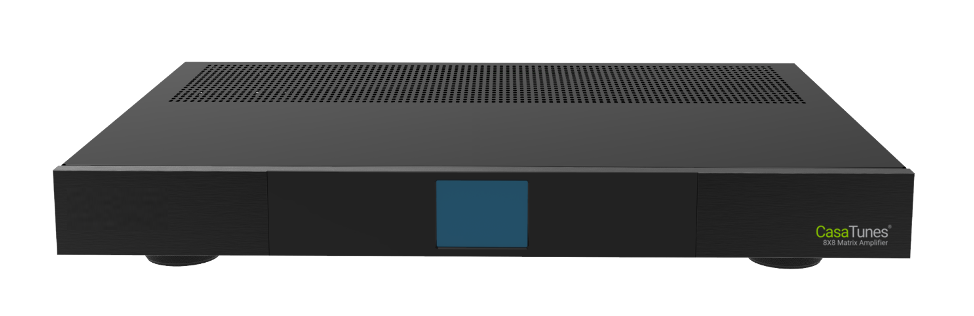
A front view of the CasaTunes 8X8 Matrix Amplifier
2

Welcome and congratulations on your purchase!

Use this guide to quickly setup and configure your CasaTunes 8X8 matrix amplifier by following these steps:

  • Unpack and verify your system contents
  • Connect the matrix amplifier network, sources, speakers, keypads, and power cables
  • Use the CasaTunesX browser App to configure your matrix
  • Use this guide in conjunction with the QuickStart Guide for your music server to setup your system
3

What's in the box?

4

Matrix Amplifier Connections

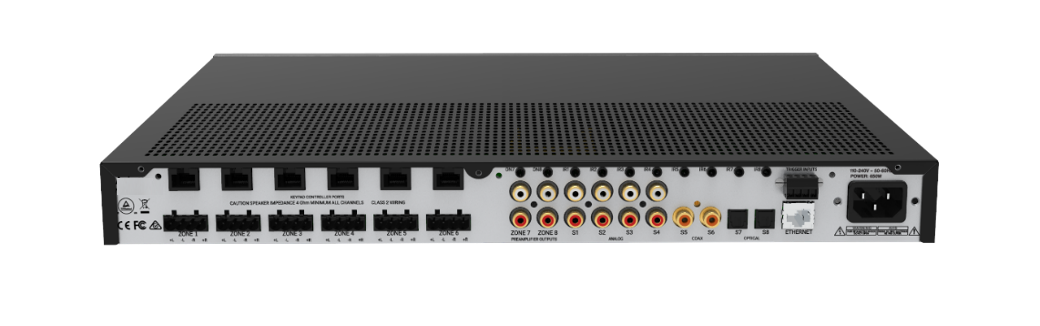
A rear view of the CasaTunes 8X8 Matrix Amplifier connectors
  • Connect a network cable to the Ethernet (network) port on the back of the matrix amplifier
  • The CasaTunes 8X8 Matrix Amplifier has eight audio input sources. Source inputs 1-4 are analog stereo audio inputs, sources 5 & 6 are coax digital audio inputs, and sources 7 & 8 are optical (S/PDIF) digital audio inputs
  • Connect all your CasaTunes music server streams and other source components to your matrix amplifier
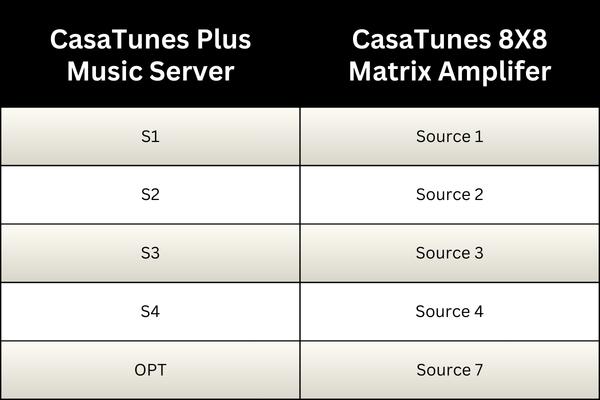
  • When using a CasaTunes Plus music server, connect the music server streams as follows, depending on the number of licensed streams:
5

Connections Continued...

  1. Connect the speaker outputs on the amplifier to your room speakers. 16 AWG wiring is sufficient for most installations. 8-ohm speakers are recommended, although the amplifier is 4-ohm stable on a maximum of 3 zones. Exceeding this limitation can cause damage to the amplifier and is not covered by the warranty
  2. Zone 7 & 8 outputs are pre-amplified analog audio outputs which can be used with a secondary power amplifier (like the CasaTunes CT-250A/CT-2100A stereo amplifiers), an AV Receiver, or a powered subwoofer
  3. Zones 7 & 8 also include a Low Pass Filter specifically designed for use with a powered subwoofer. Use the CasaTunesX App to enable and configure the low pass filter for each zone
  4. The CasaTunes 8X8 Matrix Amplifier supports optional keypads. Connect any CT-KP2 keypad to the amplifier using Cat5e/6 cables terminated with an RJ45 connector. You can connect up to 6 keypads per amplifier. By default the keypad connected to Port 1 controls Zone 1, etc
  5. You can re-assign the zone to be controlled by a keypad using the amplifier browser utility. Refer to the CasaTunes 8X8 Matrix Amplifier manual for more information
  6. Once you have completed making the matrix amplifier connections, power on the matrix amplifier, then the music server, and complete the software setup
  7. If setting up more than one amplifier, make sure you power each amplifier one at a time. Start with the master amplifier (the first CT-8X8 matrix amplifier), followed by the additional matrix amplifiers. Zone numbers are automatically assigned to zones on a matrix amplifier when the amplifier is discovered on the network
6

Using the CasaTunesX App

Open your browser and enter the following:

PC: http://casaserver/casatunesx
MAC: http://casaserver.local/casatunesx

Open the Menu and navigate to Settings (see below):
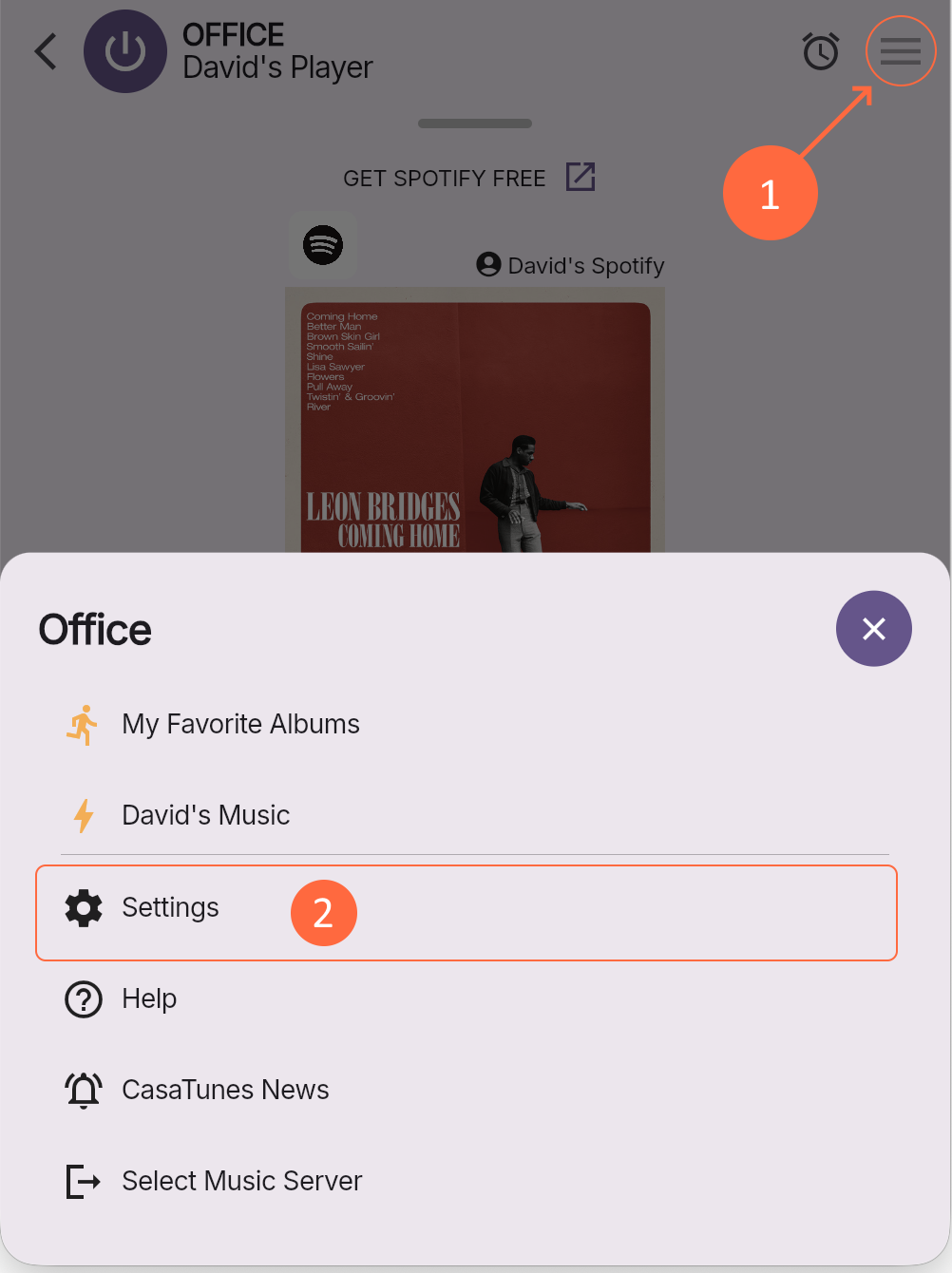
Select System Setup → Matrix Amplifier → Matrix Model to change the matrix model, and select CT-5X4/CT-8X8/CT-12X8 from the list

CasaTunes automatically discovers your CT-8X8, CT-12X8 and CT-5X4 Matrix amplifiers on the network. The amplifiers are also automatically configured the first time they are discovered on the network. Therefore it is important to make sure you power on the amplifiers starting with the master CT-8X8MA amplifier first

7

Configure Rooms & Sources

After selecting the matrix model, configure your rooms and sources

Open the Menu and navigate to Settings → System Setup → Rooms to configure your rooms, and Settings → System Setup → Sources to configure your sources

For more detailed information on how to configure rooms and sources check out the CasaTunes 8X8 Matrix Amplifier manual

If you are new to CasaTunes, you may also want to check out our video series on how to install a CasaTunes system

8

Helpful Links

Here are some links you can use to submit a support ticket, access the CasaTunesX App guide, setup remote access, and other Technical Documentation

9

Need Help?

For other questions, please contact:

support@casatunes.com
(+1) 970.237-3140 x2