Bring the power of CasaTunes multi-zone audio to your Crestron projects with the free CasaTunes Crestron Integration Kit—a production-ready solution designed specifically for Crestron 4-Series processors.
Delivering comprehensive two-way control, real-time feedback, and seamless integration with CasaTunes music servers and audio distribution systems, the module enables programmers to create responsive, feature-rich user experiences while significantly reducing development time.

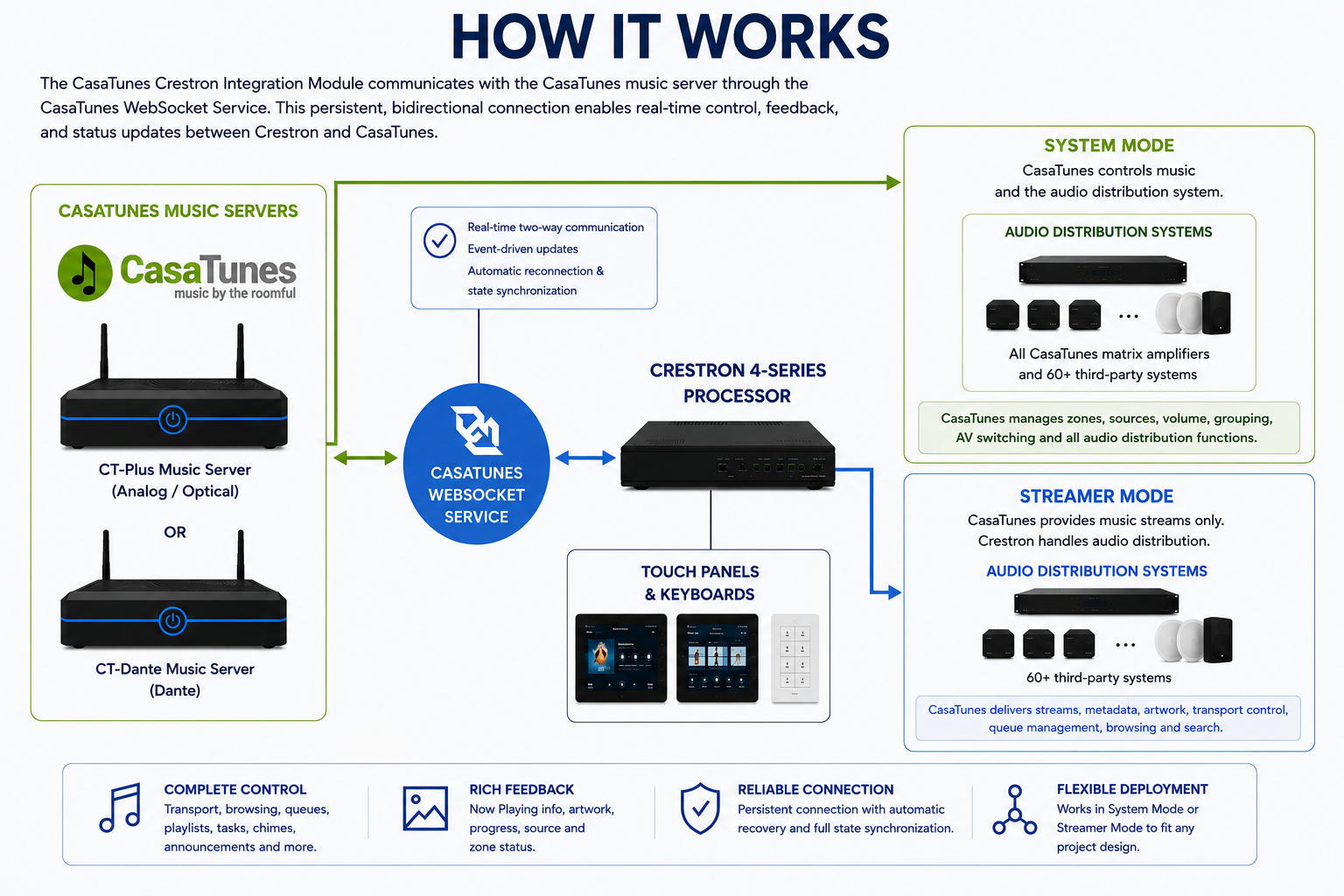
The CasaTunes Crestron Integration Module communicates with the CasaTunes music server through the CasaTunes WebSocket Service. The service maintains a persistent, bidirectional connection between the Crestron 4-Series processor and the CasaTunes server, allowing commands, status updates, media information, and event notifications to be exchanged instantly.
The WebSocket Service supports the complete CasaTunes product family, including CT-Plus and CT-Dante music servers, and integrates with every audio distribution system supported by CasaTunes. This includes all CasaTunes matrix amplifiers as well as more than 60 third-party audio distribution systems, giving integrators the flexibility to deploy CasaTunes in both new installations and existing multi-room audio environments.
The integration supports CasaTunes' two deployment models:
In System Mode, CasaTunes controls both the music server and audio distribution system. Crestron handles the user interface and automation, while CasaTunes manages playback, multi-room distribution, source selection, zone grouping, volume, mute, and AV switching. Ideal for systems using CasaTunes matrix amplifiers.
In Streamer Mode, CasaTunes serves as a multi-stream music source. Crestron or a third-party system manages audio routing, amplification, and zones, while CasaTunes provides streams, metadata, artwork, transport control, queue management, browsing, and search. Ideal for integration with Crestron DSPs, audio matrices, and third-party systems.
Regardless of the deployment mode, user interactions from Crestron touch panels or keypads are sent to CasaTunes via the Crestron processor and CasaTunes WebSocket Service. As playback or system status changes, CasaTunes automatically pushes real-time updates—including artwork, metadata, playback progress, source changes, and zone status—back to the Crestron processor. Because communication is event-driven rather than polled, the user interface remains responsive while minimizing processor and network overhead.
The WebSocket Service continuously monitors the connection, automatically reconnects after interruptions, and performs full state synchronization whenever necessary. This ensures the Crestron user interface always reflects the current state of the CasaTunes system without requiring manual intervention.
The CasaTunes Crestron Integration Module provides comprehensive two-way integration between Crestron Custom Programming and CasaTunes music servers, giving programmers access to virtually every aspect of the CasaTunes platform.
Control and monitor the entire CasaTunes multi-room audio system from a single Crestron program, including multiple music streams, independent listening zones, and grouped zones.
Control zone power, source selection, volume, mute, grouping, ungrouping, sleep timers, and stream assignment with real-time feedback.
Complete transport control including Play, Pause, Stop, Previous, Next, Shuffle, Repeat, Seek, and playback progress. Display album artwork, artist, album, track title, elapsed time, and duration.
Browse music services, playlists, albums, artists, genres, favorites, and featured content directly from the Crestron user interface with powerful search capabilities.
View and manage the active playback queue, save the queue as a playlist, clear the queue, and start playback from any item.
Trigger CasaTunes Tasks and announcements directly from Crestron, including scheduled automations, doorbell and paging chimes, and text-to-speech announcements.
Automatic connection monitoring, keep-alive messaging, reconnection, and complete state synchronization ensure reliable operation without user intervention.
The module exposes familiar Digital, Analog, and Serial joins that integrate naturally into SIMPL Windows while providing comprehensive feedback.
Includes a built-in CRPC bridge that enables CasaTunes to work seamlessly with the Crestron Media Player and CH5 Media Player components, simplifying modern HTML5 user interface development.

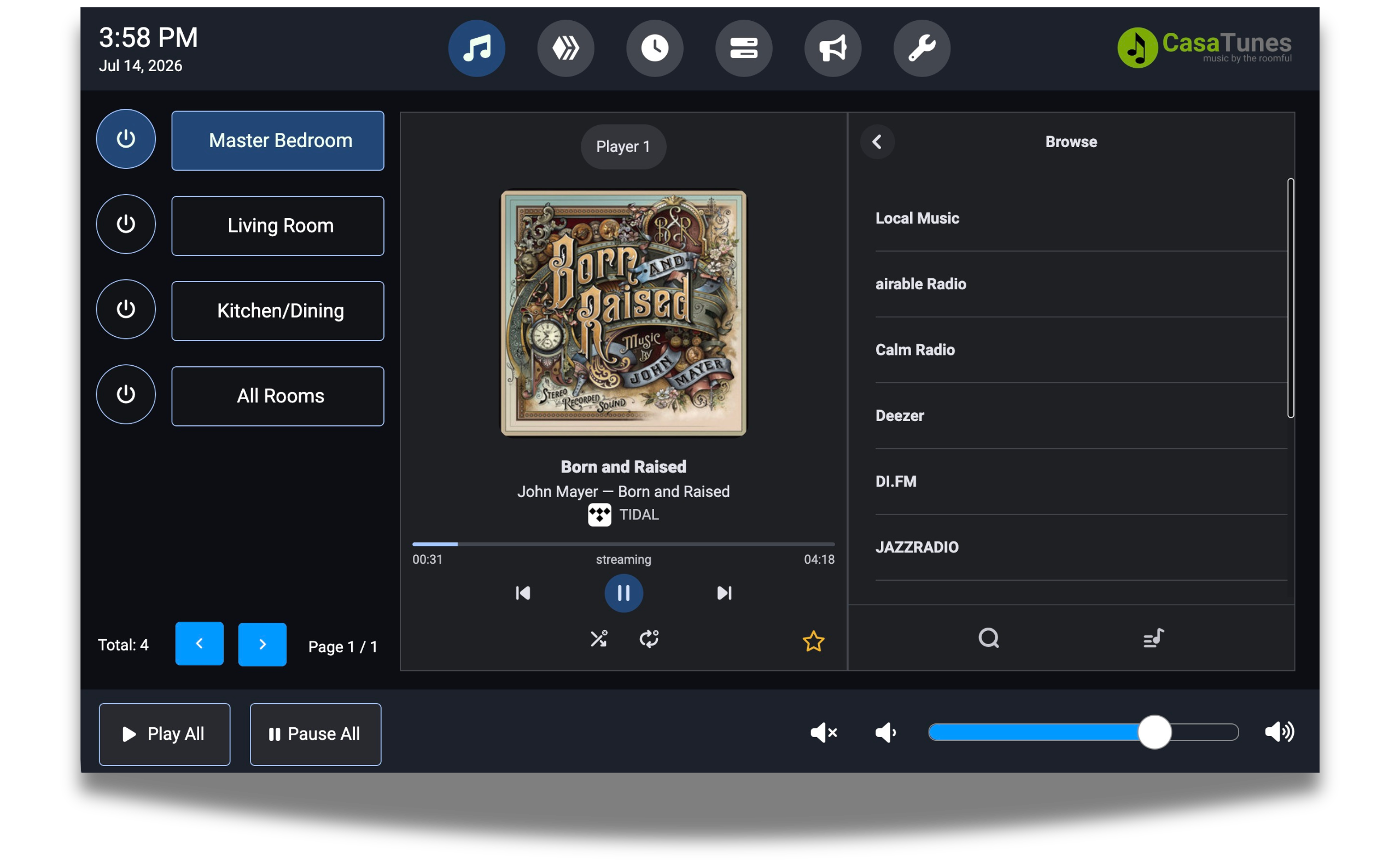
To help programmers get started quickly, the package includes three complete frontend examples demonstrating different development approaches.
Choose the development workflow that best fits your project.
Use the native Crestron Media Player or CH5 Media Player through the built-in CRPC Bridge, or create a completely custom interface using the exposed Digital, Analog, and Serial SIMPL signals.
Comprehensive documentation is included to help you deploy, customize, and maintain the integration.
The documentation package includes:
These resources are designed to minimize development time and simplify commissioning while helping programmers build production-ready integrations.
Whether your project uses classic Smart Graphics, Construct, or a modern React application, the integration provides the flexibility to build exactly the user experience your customer requires.
Download the CasaTunes Crestron Integration Kit today and start building your CasaTunes-powered Crestron solution.
Ensure your CasaTunes music server is running software version 5.00.260413 or later. If not, then:
The Crestron Integration Module communicates with the CasaTunes music server through the CasaTunes WebSocket Service, which must be enabled before configuring the Crestron driver.
